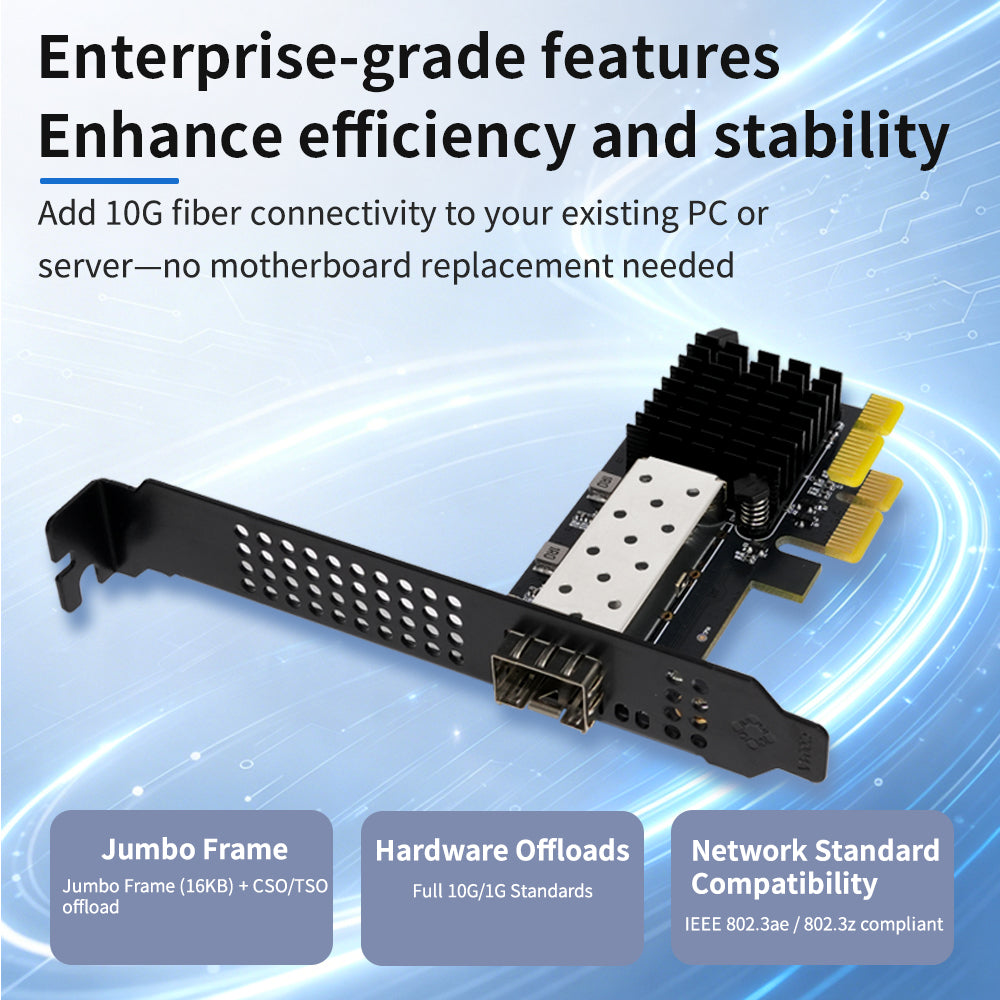
Lekuo PR27F12 – PCIe 10G SFP+ Network Card with Realtek RTL8127
The Lekuo PR27F12 is a single-port 10 Gigabit SFP+ PCIe network card powered by the Realtek RTL8127 chipset. Designed for home servers, NAS builds, and virtualization environments, it delivers full 10Gbps fiber connectivity with an industry-leading ultra-low power draw of just 1.79W under full load — no fan required.

Chipset & Interface
Powered by the Realtek RTL8127 chipset, this NIC offers exceptional compatibility across Windows, Linux, and major hypervisors. The PCIe 4.0 x1 physical connector fits into any PCIe x1, x4, x8, or x16 slot on your motherboard, delivering full 10Gbps full-duplex bandwidth without requiring a wider slot.

Low-Profile & Full-Height Bracket Support
The PR27F12 ships with both a full-height bracket (pre-installed) and a low-profile half-height bracket, making it compatible with standard ATX towers as well as compact SFF and rack-mount chassis. Simply swap the bracket to fit your build.

SFP+ Port – Flexible Fiber & DAC Connectivity
The single SFP+ port supports 10GBASE-R and 1000BASE-X standards, compatible with a wide range of modules and cables:
- SR multimode fiber (850nm, up to 300m)
- LR single-mode fiber (1310nm, up to 10km)
- ER single-mode fiber (1550nm, up to 40km)
- DAC direct-attach copper cables
- AOC active optical cables

Ultra-Low Power: Only 1.79W at Full 10G Load
The RTL8127 is engineered for exceptional energy efficiency. At full 10G load, typical power consumption is just 1.79W — dropping to as low as 0.29W in 1G mode. This is approximately 75% less than traditional Intel X520 NICs. The result: a completely fanless, passive-cooled design that runs silently 24/7, ideal for noise-sensitive home servers and compact desktops.

Broad Compatibility – NAS, Virtualization & Soft Routers
The PR27F12 is a versatile upgrade for a wide range of platforms:
-
OS: Windows 10/11, Linux (kernel 2.4+)
-
NAS: TrueNAS, Xpenology (Synology DSM)
-
Virtualization: Proxmox VE (PVE), VMware ESXi
-
Soft Routers: OpenWrt and other router-on-a-stick setups
-
Advanced Networking: IEEE 802.1Q VLAN & 802.1ad Q-in-Q, Jumbo Frames up to 16 KB

Package Contents
- 1 × PCIe 10G SFP+ Fiber NIC (full-height bracket pre-installed)
- 1 × Low-profile half-height bracket
- 1 × User Manual

URL:https://cn.lekuo.com/uploadfile/upload//data/upload/image/RTL8127.zip
Q: Which operating systems and virtualization platforms does this 10G NIC support? Is it compatible with Xpenology or TrueNAS?
A: Driver installation is required. This NIC features the Realtek RTL8127 chip, offering excellent compatibility. It not only natively supports Windows 10/11 and Linux kernels 2.4+, but also works with mainstream virtualization and NAS systems such as TrueNAS, Proxmox VE (PVE), and VMware ESXi. For soft router, all-flash NAS, and Xpenology (Synology DSM) enthusiasts, it is a cost-effective 10G upgrade choice.
Q: What is the actual power consumption of this NIC? Does it require an additional fan for cooling?
A: This NIC is designed for ultra-low power consumption and silent operation. Under full 10G load, typical power consumption is only 1.79W (dropping to as low as 0.29W in 1G mode), saving about 75% power compared to traditional Intel X520 NICs. Thanks to this ultra-low heat generation, it uses a fanless (passive) cooling design, supporting 24/7 silent operation – ideal for noise-sensitive home servers and compact desktop PCs.
Q: My motherboard only has a PCIe x1 slot. Can I use this 10G NIC? What is its physical interface?
A: Yes. Although this NIC is designed with a PCIe 4.0 x1 specification, its physical edge connector is PCIe x1. It can be inserted into PCIe x1, x4, x8, or x16 slots on your motherboard. As long as your motherboard slot supports PCIe 4.0 x1, it can deliver full 10Gbps full-duplex bandwidth.
Q: Which fiber modules does this SFP+ port support? Can I use DAC direct-attach cables or AOC active optical cables?
A: The port is a standard 1 × SFP+ (10GBASE-R / 1000BASE-X). It supports various mainstream SFP+ multimode fiber modules (SR 300m), single-mode fiber modules (LR 10km / ER 40km), as well as DAC (Direct Attach Copper) and AOC (Active Optical Cables), making it convenient for short-distance low-latency stacking within racks or long-distance cabling.
Q: Does this NIC support 2.5G or 5G speeds?
A: The optical (SFP+) interface adheres to the 10GBASE-R and 1000BASE-X physical layer standards, primarily supporting 10 Gbps and 1 Gbps speed tiers. It does not natively support 2.5G/5G NBASE-T speeds. If you need to connect to a 2.5G switch, we recommend choosing other Lekuo NIC products based on the RTL8125B chip.
Q: Does this NIC support Jumbo Frames? What is the maximum setting?
A: Yes. This NIC supports Jumbo Frames up to 16 KB. In NAS storage transfers, iSCSI mounting, or high-throughput LAN environments, enabling Jumbo Frames can significantly reduce CPU overhead and improve the stability and speed of large file transfers.
Q: Does it support VLAN tagging and Q-in-Q? Is it suitable for router-on-a-stick configurations?
A: Yes. It complies with IEEE 802.1Q VLAN and 802.1ad Q-in-Q standards. This makes it well-suited for complex network topologies, multi-tenant environments, or router-on-a-stick (VLAN Trunking) configurations in soft router/virtualization setups (e.g., PVE/OpenWrt), enabling easy multi-subnet isolation and traffic tagging.
Q: Since it’s fanless, will it overheat and disconnect during sustained full-load transfers in hot summer conditions?
A: No. Although it uses passive cooling, the RTL8127 chip itself generates very little heat (1.79W). The NIC is designed with a wide operating temperature range of 0°C to +70°C. As long as there is basic airflow or minimal air circulation inside the chassis, the NIC will remain stable and maintain full speed even under high loads during summer.
Q: What accessories are included in the package when purchasing this product?
A: The standard package includes: 1 × PCIe 10G SFP+ Fiber NIC (with full-height bracket pre-installed), 1 × Low-profile half-height bracket (for small form factor cases), and 1 × User Manual. Upon receipt, simply choose the appropriate bracket for your chassis type, insert the NIC into a PCIe slot, and you’re ready to go.