One Enclosure. Two Worlds. Unlimited Potential.
The DTB3S61 is a desktop-class hybrid storage enclosure engineered for professional creators, small studios, and high-performance computing users. It combines blazing NVMe speed with massive SATA capacity — all through a single 40Gbps Type-C connection.

Dual 40Gbps Type-C Ports — Connect Everything
Two front-facing Type-C 40Gbps ports (USB4 / Thunderbolt 3/4/5 compatible) give you maximum flexibility. Use one to connect your host machine at full 40Gbps bandwidth, and the other for video output, device charging, or daisy-chaining additional peripherals — building a seamless, high-efficiency workflow from a single hub.

Dedicated 32Gbps NVMe Lane — Full Speed, No Compromise
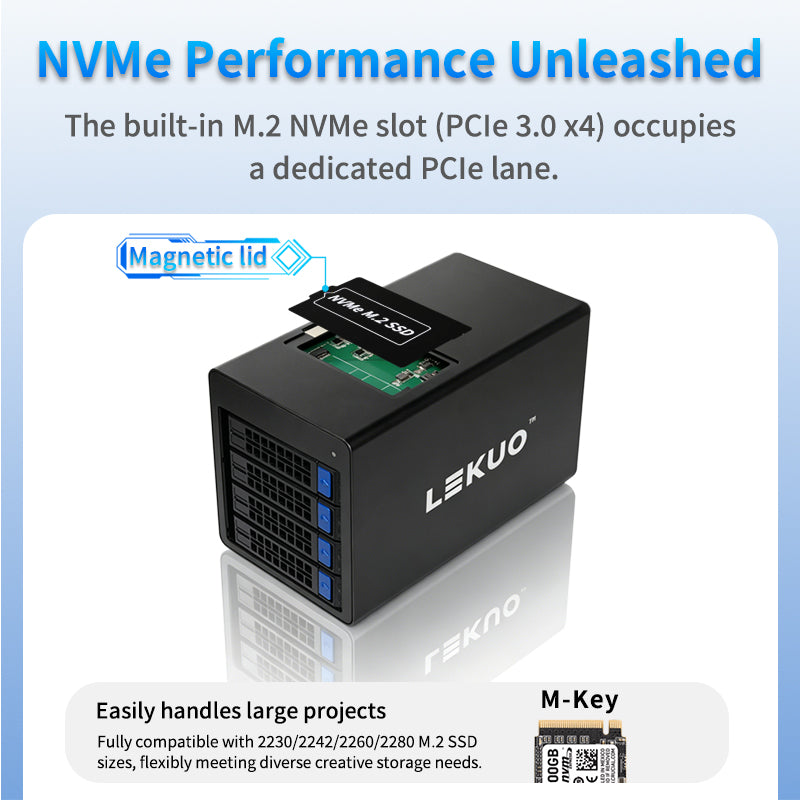
The M.2 NVMe slot (PCIe 3.0 x4) runs on its own dedicated PCIe channel — no bandwidth sharing, no bottlenecks. Your NVMe SSD performs at its absolute maximum, making it ideal for 4K/8K video editing, large project loading, and any high-throughput workload that demands instant response.

4-Bay SATA Array — Speed and Capacity, Both
Four SATA III (6Gbps) bays support any combination of SSDs and HDDs, scaling up to 128TB of local storage (subject to drive and system support). All four bays share a 10Gbps USB 3.2 Gen2 channel — enough to saturate even the fastest SATA SSDs — making it perfect for media archiving, multi-project backup, and parallel data processing.

Intelligent Thermal Control — Quiet When It Matters
The built-in smart fan automatically adjusts its speed based on internal temperature, keeping your drives cool and stable without unnecessary noise. Whether you're recording audio, live streaming, or working in a quiet studio environment, the DTB3S61 stays whisper-quiet under normal loads.

Professional-Grade Reliability Features
- ✅ SATA hot-swap support — swap drives without powering down
- ✅ System sleep/wake compatible
- ✅ AHCI & NVMe dual-protocol support
- ✅ LED status indicators for power, read/write activity, and drive fault
- ✅ Premium aluminum alloy chassis for durability and passive heat dissipation

Built for Every High-Performance Use Case
-
Creative Workflow Accelerator: Use NVMe as a high-speed cache and SATA bays as your media library — ideal for video editors, 3D artists, and audio producers.
-
AI & Data Analytics Platform: Fast data ingestion for local AI model training and inference, with massive on-device dataset storage.
-
Personal / Studio Data Center: Build a reliable multi-bay backup and archival system to protect your critical digital assets.
-
High-Performance Computing Expansion: Plug-and-play desktop storage expansion for any laptop or desktop with a 40Gbps Type-C port.

Technical Specifications
| Model |
DTB3S61 |
| Host Interface |
2 × Type-C 40Gbps (USB4 / Thunderbolt 3/4/5) |
| NVMe Slot |
1 × M.2 NVMe (PCIe 3.0 x4), up to 32Gbps |
| SATA Bays |
4 × SATA III (6Gbps), shared 10Gbps bandwidth |
| Supported Drive Types |
NVMe SSD, SATA SSD, SATA HDD |
| Max Capacity |
Up to 128TB (drive & system dependent) |
| Power Supply |
DC 12V / 10A (adapter included) |
| Cooling |
Smart variable-speed silent fan |
| Chassis Material |
Aluminum Alloy |

What's in the Box
- 1 × DTB3S61 Hybrid Storage Enclosure
- 1 × 12V 10A Power Adapter
- 1 × Type-C 40Gbps Cable (0.8m)
- 1 × User Manual
System Requirements
- macOS 10.15 or later
- Windows 10 / 11
- Linux (Kernel 5.4+, with USB4 / Thunderbolt 3/4/5 support)
- Host device must have a Type-C 40Gbps port
No driver available for this product.
Q: What is the upstream interface of the hard drive enclosure? Which protocols does it support?
A: The upstream interface is a 40Gbps USB4 port, which is also backward compatible with Thunderbolt 5/4/3 protocols. It seamlessly connects to Windows laptops, MacBooks, and Mini PCs with USB4 or Thunderbolt ports without any adapter, achieving true "one-cable" high-speed storage expansion.
Q: How is the bandwidth allocated among the 4 bays? Will they compete for speed?
A: The 4 SATA bays share a USB 3.2 Gen2 channel with a total bandwidth of 10Gbps (about 900MB/s effective). When a single drive is active, it can hit the SATA III 6Gbps limit; when multiple drives are concurrent, bandwidth is dynamically shared—for example, 4 drives simultaneously read/write, each gets about 225MB/s on average. This design suits scenarios like backup archives, media asset storage where single-drive peak speed is not critical but multi-drive parallelism is needed.
Q: What is the bandwidth of the top NVMe slot?
A: The NVMe slot directly connects to a PCIe 3.0 x4 channel, offering theoretical bandwidth of 32Gbps (about 3000MB/s effective). It supports PCIe 3.0/4.0/5.0 NVMe SSDs. Note: Due to the upstream USB4 and controller limitations, even if you install a PCIe 4.0/5.0 SSD, the actual speed is capped at PCIe 3.0 x4 levels, so you cannot unleash the full performance of newer SSDs, but they are fully compatible and stable.
Q: Do the 4 SATA bays support HDDs or SSDs?
A: They support both 2.5/3.5-inch SATA mechanical hard drives (HDD) and SATA solid-state drives (SSD), compatible with 7mm/9.5mm thickness. We recommend using SATA SSDs for editing cache and HDDs for cold data archiving to balance speed and capacity.
Q: How does the magnetic cover of the top NVMe compartment work? Do I need tools?
A: The magnetic cover uses strong magnets plus positioning clips. You can flip it open with one hand without any screwdriver or tools; when closing, it snaps into place automatically and stays firm.
Q: What sizes of NVMe SSDs are supported?
A: It supports 2230/2242/2260/2280 lengths. During installation, align the gold fingers with the slot, insert at an angle, and press flat—there's no risk of wrong orientation. There is a reserved spot for thermal pad inside; we recommend applying it for better heat dissipation. It does not support 22110 extra-long enterprise SSDs.
Q: Will the magnetic cover accidentally pop open during daily transport?
A: No. With the recessed slot design on the body, it stays secure even with bumps or light knocks inside a backpack.
Q: What is the purpose of the included 12V/10A power supply? Can I use a PD charger instead?
A: The 12V/10A (120W) DC power supply is specifically designed for the peak startup current of 4 HDDs (up to 2A per drive) and the full-load power of the NVMe SSD, ensuring no drive dropouts or speed throttling during multi-drive concurrent operation. It cannot be replaced by a USB-C PD charger, as PD cannot provide a stable 12V high current; forcing it may cause drive damage or controller protection shutdown.
Q: How does the smart temperature-controlled fan work?
A: Built-in temperature sensors monitor the NVMe and SATA areas in real time. When the temperature is below the threshold, the fan stops (zero noise); above the threshold, it automatically starts.
Q: Can the fan be manually turned off or replaced?
A: Manual shutdown is not supported; the temperature control is hardware-automated to avoid human error leading to overheating. It is strictly forbidden to remove the fan and run it under full load for extended periods.
Q: Which operating systems are supported? Do I need to install drivers?
A: It supports Windows 10/11, macOS 10.15+, and Linux (kernel 4.14+). It is plug-and-play across all platforms without any driver installation.
Q: Can it be used on non-USB4/Thunderbolt computers?
A: It only works with computers that have USB4 or Thunderbolt 3/4/5 ports. Standard USB-C, USB-A, or Mini DP ports will not recognize the device. If your computer only has a USB 3.2 Gen2 port, physically it may plug in, but it won't activate the 40Gbps channel and the device won't function properly. Please verify that your port has the Thunderbolt or USB4 logo before purchasing.
Q: Who is this product best suited for? Any key reminders for usage?
A: It is ideal for: ① Video editors (NVMe as editing cache + SATA bays for raw footage), ② Cross-platform developers (seamlessly switch test drives between Mac/Win/Linux), ③ Data backup specialists (4-drive rotation archiving + NVMe for fast verification), ④ IT engineers (tool-less drive swapping for troubleshooting).
Key reminders: ❶ Always use the original 12V/10A power supply; ❷ Although the NVMe cover is magnetic, do not invert and shake the unit; ❸ Accept the 10Gbps shared bandwidth limit when all 4 drives are active; ❹ Keep the USB4 cable length within 0.8 meters to avoid signal degradation; ❺ Regularly clean dust to maintain fan efficiency.